Wednesday, 8 April 2015

How To Share PDF, ZIP & APK Files on WhatsApp

With almost 600+ million users, WhatsApp is no more anonymous to anyone. Whether it’s you or me, no one can spend even few hours without using this amazing instant messaging client. Apart from live chat, mesmerising features like sharing media and other data are the key features that allows WhatsApp to hold number of users with it. Even though Whatsapp is now owned by Facebook, it doesn’t have the feature to send PDF, Apk or Zip files on it like the Facebook messenger. You can anyway share any video, image, audio or any other type of file through third-party sources without compromising quality and share them with your buddies. However, it can be a bit lengthy. So, have a look on some easy steps to share media to your friends with no loss of quality.
Whatsapp Pdf,zip files sharing
 STEPS TO BE FOLLOWED :-
  1. First of all, download and install the official Dropbox app. There is no problem if you have Dropbox account already. Signup for an account if you don’t have one. Login to it.
  2. Then download and install CloudSend. When you launch the app, you will go through a quick tour. All you have to do is  swipe from right to left on your device’s screen. It will ask you to authorize this app by the end. Then click Allow. In your Dropbox folder, a folder will be automatically created by the name “CloudSend”. You will be able to control it completely. Now you can close the app after completing the authorization.
  3. In order to send any type of file, press and hold the file through file manager and choose Share button.
  4. Choose CloudSend option from popup.
  5. Hold on while the selected file is being uploaded on CloudSend folder created on Dropbox. The duration of file transfer vary according to the connection speed and size of file. The best part of CloudSend is that it doesn’t have any restrictions regarding file size. You will have two options after completion of upload – Copy and Share. Either you can share the file or copy the link of any file directly.
  6. When you select Share, you will be able to share your file in different platforms like Email, Whatsapp, SMS, Google+, WeChat, Facebook and other applications your device have. Select WhatsApp.
  7. It will prompt you to choose WhatsApp contacts you want to share that link with. Share that link with your desired recipient. It will show link with file name. If file is supported on your friend’s device, it will show the preview of file. Or file can also be downloaded through other browsers                 THANKS-TECHEWS

Friday, 3 April 2015

Open Source Windows?

microsoft-windows-open-source

Open Source Windows?…. “It’s definitely possible. It’s a new Microsoft.”

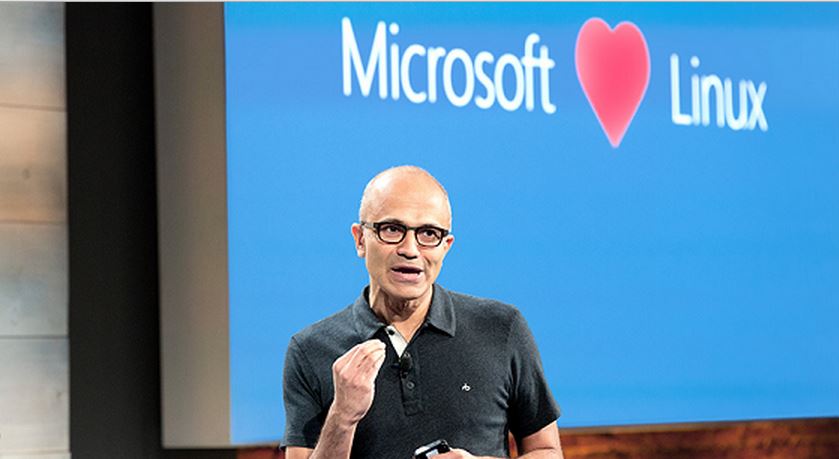
We all know Microsoft as “Microsoft” because of its pioneering work in operating system arena which gave rise to the Windows. A very large chunk of devices all around the world run on Windows. In recent times, the company is being noticed and appreciated for its open source endorsement. Could this result in an open source Windows? According to a top Microsoft engineer, this impossible open source Windows could “definitely” become possible in future and we can see an open source Windows.
It’s a well-known fact that there are two types of operating systems: open source and closed source. Windows and OS X are the closed source operating systems because their code isn’t available to public to change and modify it. On the other hand, open source systems like Linux allow the users and coders to retouch it and create unique builds. An open source Windows will completely change the present OS market.
Microsoft engineer Mark Russinovich helped to create Windows and holds the title Microsoft Technical Fellow. He was speaking at ChefConf which is an open-source focused conference. Chef is an open source tool helping people to operate and set up the systems needed to run a website or some app.
Wired writes that at the conference, Russinovich asked the audience that how many of them use Windows 10 on their systems. Surprisingly, out of the hundreds, just one guy raised his hand and rest of them were Linux dependent. This wasn’t unexpected for Russinovich and he said, “That’s the reality we live in today.”

Over the years, Microsoft has made billions of dollars by keeping the Windows closed source. As a positive change, since Satya Nadella has taken over as the Microsoft chief, the birth of a new Microsoft is on its way. In December, Microsoft announced that .NET Core stack will be running cross platform along with the support for open source for Docker containers on Windows Server. Also, Microsoft is committed to provide free one year upgrade to the existing Window 7, 8 and 8.1 users.
Talking about the open source Windows, he added:
“Every conversation you can imagine about what should we do with our software—open versus not-open versus services—has happened.”
An open source Windows isn’t coming very soon as Windows is still one of the major revenue sources for Microsoft. But, this indication and opening up of Microsoft to embrace more open source will surely be welcomed.